Home › NAS Drive Data Recovery
NAS Drive
Data Recovery
Synology, QNAP and other network attached storage rebuilt on the bench in Maylands. Each member drive is imaged separately before the array is reconstructed in software.
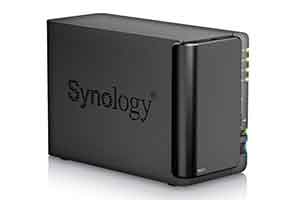 Home & office NAS recovered
NAS Data Recovery
Most consumer-grade and home-office NAS units have one or two bays, while models designed for the office have four or more. But that’s not an absolute guideline, especially now that newer NAS devices are showing up with support for 2.5-inch laptop-style drives, both platter-based and solid state.
The beauty of a NAS device is that it can use some version of a technology called Redundant Array of Independent Disks (RAID). This tech allows the software that manages the NAS devices to distribute and duplicate the data it stores across multiple hard disks.
Home NAS or Office NAS?
Home NAS
Most home based NAS drives will have two bays, which means that you can set them up as RAID 1. In this scenario, the second drive is a mirror of the first, so if one drive fails completely all your data is safe on the other. You can then replace the faulty disk, and rebuild the RAID array.
Office NAS
A typical business scenario might be sharing access to Office files, like spreadsheets and Word documents, with your coworkers and perhaps backing up select office devices on a regular basis. All of that is relatively simple for a NAS. Additional layers of data security and serving files to a relatively large number of users is typically where businesses need to be careful about NAS storage.
Common NAS Failures
As well as the failure of an individual drive, NAS devices are also prone to the following.
Power surge
Causing physical or logical corruption across the array.
Virus attack
Malware reaching the shared volume through the network.
Security system failure
Data could not be viewed due to security system failure.
Lost network volume
Loss of network shared volume due to accidental reformat or loss of original configuration.
Go deeper on NAS and RAID
Is your NAS offline?
Bring the whole unit in with its drives. The examination and quotation are no charge and obligation free.