
Home › Camera Card & SD Card Data Recovery
SD Card & Camera Card Data Recovery
Cards rarely fail physically. Most of the time the photos are still there and the file system is the problem — which is why recovery is usually straightforward.
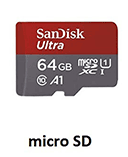 SD · microSD · CF · XQD
The most common memory card packages
The data is usually still on the card
Digital cameras store photos and videos on removable memory cards such as SD, SDHC, SDXC, and microSD cards. These cards are designed for convenience and portability, but they can still experience failures that result in lost or inaccessible files.
When a camera card becomes corrupted, the files may appear to have disappeared or the card may appear empty. In many cases, however, the actual photo and video data is still stored on the memory card. The problem is often related to damage within the file system that keeps track of where the files are located.
Specialised data recovery software can analyse the memory card at a low level, bypass the damaged file system, and scan the storage area directly to locate recoverable files. This process can often recover photos, videos, and other media even when the camera or computer can no longer access the card.
Stop shooting on that card
For the best chance of recovery, avoid taking new photos or videos on the card after data loss, as new data may overwrite the existing files and reduce the possibility of successful recovery.
Common Memory Card Problems
Accidental Re-Format
Your files are missing after the card is formatted.
Card is not Readable
When you try to use the card, you may receive “this card cannot be used” or “this card cannot be read” error messages on the device screen. This issue is also very common.
Invalid File System
When you attempt to access the memory card on your PC or Mac the message no valid file system is displayed. This can be due to logical corruption of the file system, or the file system cannot be recognized by the PC.
Memory Card Runs Slowly
Sometimes you may feel that your memory card runs much more slowly when transferring data than before. Undoubtedly, it means that something wrong must occur to your card.
Cannot Be Read by Computer
If you want to access the memory card from your computer, you will usually use a card reader. At this point, it is also a frequent case where you find that the card cannot be read by your PC.
Missing or Unreadable Files
The card shows files on your memory card are missing, disappear or cannot be displayed.
Memory Card Shows Empty
Another problem — your files are gone. Your memory card shows empty directly, but you can be sure there was data in it before.
Physically Damaged Card
Memory card is so sensitive that it can become damaged physically due to things like power fluctuations or heat damage.
Card Data Recovery Process
Memory cards used in modern digital devices typically rely on a file system known as FAT (File Allocation Table). The file system acts like an index, storing important information about each file, such as its name, creation date, modification date, and other metadata. It also keeps track of the logical sectors where the actual file data — such as photos, videos, or music — is stored on the memory card.
Unfortunately, the FAT file system is relatively simple and can be easily corrupted. In many cases, this corruption is the underlying cause of the memory card errors experienced by users, including cards that appear unreadable, empty, or incorrectly formatted.
- Logical sector
- A small block or section of storage space where digital data is written and retrieved.
- What that means for you
- Even when a memory card appears to contain no files, the underlying data may still exist within the logical sectors of the card. Using specialised data recovery tools, we can bypass the damaged file system, scan the memory card from beginning to end, and recover lost files that are still present on the storage media.
Camera RAW files we can recover
The following list is of Camera Raw File formats we can recover from your memory card.
- Canon Raw CIFF Image File
*.crw - Canon Raw Image File
*.cr2, cr3 - Digital Negative Image File
*.dng - Fuji FinePix Raw Image File
*.raf - Hasselblad 3F Raw Image File
*.3fr - Kodak Photo-Enhancer File
*.kdc - Kodak Raw Image File
*.der - Konica Minolta Raw Image File
*.mrw - Leaf Aptus Raw Image File
*.mos - Leica Raw Image File
*.raw - Mamiya Raw Image File
*.mef - Nikon Raw Image File
*.nef - Olympus Raw Image File
*.orf - Panasonic LX3/LX5 Raw Image File
*.rw2 - Pentax Raw Image File
*.pef - Samsung Raw Image File
*.srw - Seiko Epson Raw Image File
*.erf - Sigma Raw Image File
*.x3f - Sony Digital Camera Raw Image File
*.arw - Sony SR2 Raw Image File
*.sr2 - Sony SRF Raw Image File
*.srf
Not sure which format your camera writes? Bring the card in — recovery may require physical examination, and the quote is free either way.
Photos gone from your card?
We do not charge for the diagnosis and our quotation comes with no obligation to proceed.