
Hard Drive Data Recovery › Failed Electronics
Failed Electronics
The most common symptom of the failure of the PCB electronics of a hard drive is that it simply receives no power.
- PCB repair
- ROM transfer
- BIOS chip
- No charge to quote
The drive receives no power at all
If the drive does nothing when powered on, or shuts off intermittently, the PCB may be at fault. Stop trying to power it and call before further attempts cause more damage.
Age of the power adapter is usually the cause
Most drives I receive with failed PCB’s have died due to faulty power and commonly this is due to the age of power adapters on portable hard drives.
Hard drive PCB’s have over voltage protection on them which is designed to fail so as to protect the motor and heads. That protection is doing its job — the board sacrifices itself so the mechanics inside the drive survive, which is why the data is usually still fully intact.
Repair ProcessFive steps on the bench
- 01
Confirm the PCB is the fault
Confirm that the PCB actually needs to be replaced. If the drive does nothing when powered on or shuts off intermittently, the PCB may be at fault.
- 02
Locate a suitable replacement PCB
The board has to match the drive family and revision, not just the model number.
- 03
Purchase the replacement PCB
Donor boards are sourced and held so a repair isn’t waiting weeks on parts.
- 04
Transfer the BIOS chip
The ROM holds drive-specific data. Without moving it across, the replacement board cannot address the platters correctly.
- 05
Connect, test and transfer
Connect the replacement PCB. Test and transfer data to a new drive.
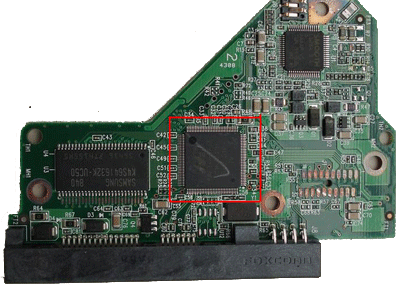
Some drives will not allow a ROM transfer
On some hard drive models eg Western Digital and Seagate the transfer of the ROM chip from the failed hard drive electronics to a working PCB is not possible. This is due to the fact that there is not a separate 8 pin chip containing the ROM on the PCB. Modern Western Digital hard drives have the ROM firmware located in the Main Controller integrated circuit of the PCB.
Separate ROM chip — standard transfer
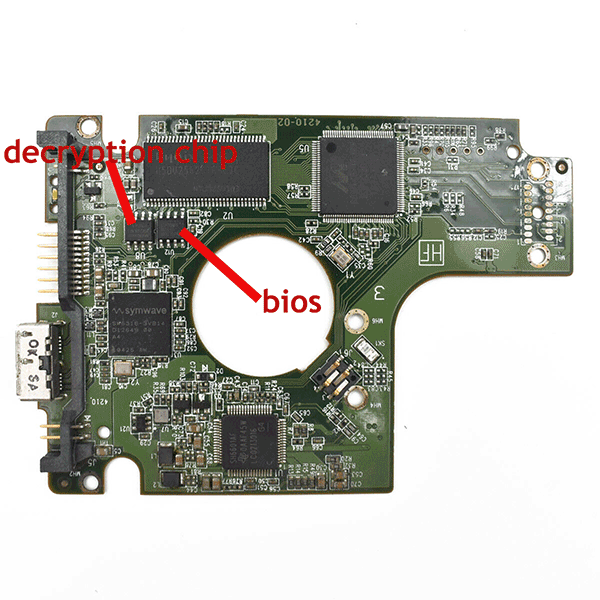 No ROM chip — specialised tools required
The pcb on the right does not have the ROM Chip and will require specialzed tools to perform the ROM transfer.